
How to give video feedback your editor can act on (30 examples)
A note needs a timecode, what you see, and what you want instead. Here are 30 vague notes rewritten so an editor can fix them in one pass.
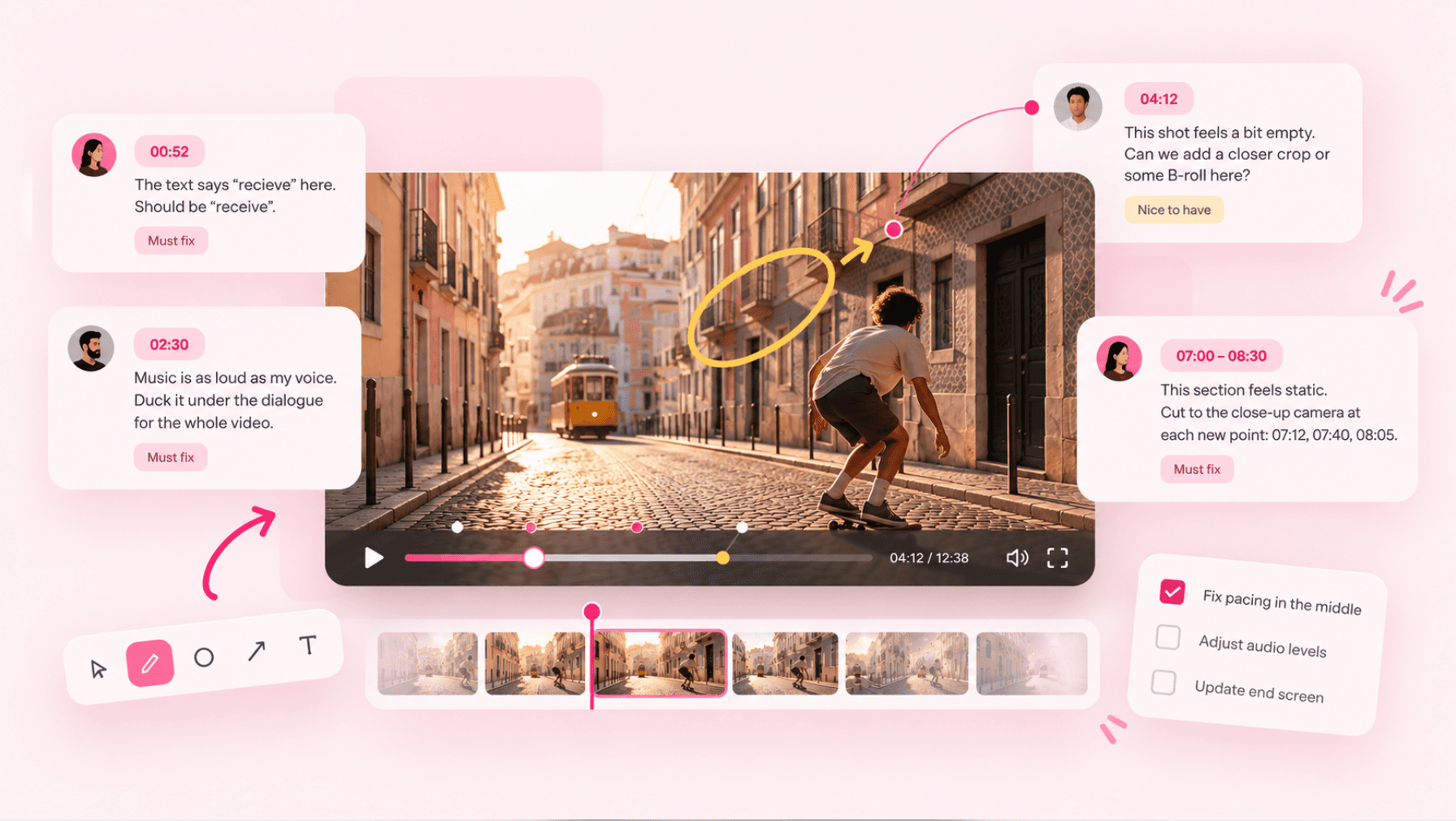
Your editor can't see what you saw. When a note says “the middle drags,” they have to guess which part drags, why, and what you want instead. Every wrong guess is another export, another upload, and another day before the video goes out.
The fix isn't longer notes. It's notes with a fixed shape: where, what you see, and what you want instead. Add why when the reason isn't obvious, and say whether it's a must or a nice-to-have.
Below are 30 common notes rewritten that way. The vague versions are the kind every editor has received. The specific versions show what to send instead. Swap in your own timecodes.
The shape of a note that gets fixed in one pass
Where. A timecode or a range:
04:12, or04:10 to 04:25. If the problem is everywhere, say so: “every lower third.”What you see. Describe the frame, not your feeling about it. “The music covers my voice” beats “the audio is off.”
What you want. A direction the editor can carry out. If you don't know the fix, describe the result you're after.
Why, if it isn't obvious. One clause is enough. It lets the editor solve the problem a better way than the one you suggested.
Priority. Must-fix or nice-to-have. On a deadline, the musts get done first.
Copy this and fill it in for each note:
04:10 to 04:25
See:  what's on screen or in the audio
Want: what it should be instead
Why:  (optional) the reason
Must / nice
Before you write a single note
Watch the whole cut once without pausing. You're checking the story, and you can't judge a story in ten-second pieces.
Then watch again and write. Pause as often as you like on the second pass.
Send one batch per version. A message every time something occurs to you means the editor starts fixing before they've seen the full list.
If several people review, one person merges the notes. Two notes that contradict each other on the same moment guarantee a wasted round. Settle it before the editor sees it.
30 examples, vague vs specific
Pacing and cuts
Vague: “The middle drags.”
Specific: “03:40 to 05:10 makes the same point as 02:15. Cut it and go straight from 03:39 to the second test at 05:11.”Vague: “Tighten it up.”
Specific: “Remove the pauses between sentences in the intro (00:00 to 01:00). Keep the pause after the reveal at 00:48, that's the joke.”Vague: “The ending is too long.”
Specific: “Cut from my last line at 11:32 straight to the end screen. Drop the outtakes from this one.”Vague: “This cut is jarring.”
Specific: “The jump cut at 06:05 changes my framing mid-sentence. Punch in on the second shot or cover the cut with product B-roll.”Vague: “Make it more dynamic.”
Specific: “07:00 to 08:30 is one static shot. Cut to the close-up camera at each new point: 07:12, 07:40, 08:05.”
Audio
Vague: “The audio is off.”
Specific: “The music at 02:30 is as loud as my voice. Duck it well under the dialogue for the whole video, not just here.”Vague: “I don't like this song.”
Specific: “The track from 00:00 to 01:20 is too upbeat for the apology. Something slower and quieter, closer to the track in episode 41.”Vague: “There's a weird noise.”
Specific: “Loud click at 04:51 when I put the mug down. Cut it or cover it with room tone.”Vague: “Fix the sound in the outdoor part.”
Specific: “Wind noise from 09:10 to 09:45. Run noise reduction, but if my voice starts sounding underwater, leave some wind in. Clear speech matters more.”Vague: “The levels are inconsistent.”
Specific: “My voice is quieter from 06:00 on (we recorded that part another day). Match it to the first half.”
Color and image
Vague: “The colors look weird.”
Specific: “Skin looks orange in the kitchen shots, 03:00 to 04:30. Match them to the desk shots, which look right.”Vague: “It's too dark.”
Specific: “At 10:20 the street is too dark to see the product. Lift the shadows. A little noise is fine.”Vague: “This shot is blurry.”
Specific: “Out of focus at 05:15. Use the second take of the same line if it's sharp, otherwise cut the shot.”Vague: “Make it look more cinematic.”
Specific: “Grade the travel montage (01:10 to 02:00) warmer and more contrasty than the talking parts, so it reads as its own section.”
Text, graphics and captions
Vague: “The text is hard to read.”
Specific: “The lower third at 00:35 is white on a bright sky. Add the dark box we use in the other episodes.”Vague: “There's a typo.”
Specific: “00:52: ‘recieve’ should be ‘receive’. The same word is wrong again at 06:14.”Vague: “The captions are off.”
Specific: “Captions run about a second late from 03:00 onward. Re-sync from there.”Vague: “Add a graphic here.”
Specific: “At 04:05, when I say ‘three times faster,’ show the two times side by side: 12 min and 4 min. Hold it for the whole sentence.”
Footage and B-roll
Vague: “Use better B-roll.”
Specific: “The stock laptop clip at 02:40 looks generic. Use the screen recording of the actual app instead (screen_02.movin the shared folder).”Vague: “Show the product more.”
Specific: “At 05:30 I explain how the lid locks, but we're looking at my face. Cut to the close-up of the lid for that sentence.”Vague: “This doesn't match.”
Specific: “At 07:20 I say ‘in summer’ over winter footage. Swap in the beach clips from the June folder.”Vague: “Remove that.”
Specific: “Blur my address on the parcel at 08:44. It's on screen for about two seconds.”
Story and structure
Vague: “The intro is boring.”
Specific: “Open with five seconds of the finished desk (09:50), then go back to the start. The current intro moves after that.”Vague: “It's confusing.”
Specific: “Nobody knows who Sam is at 03:10. Add a name title the first time Sam appears, at 01:05.”Vague: “Something's missing.”
Specific: “I talk about the price but never show it. Put it on screen at 06:40: $49 / ₹3,999.”Vague: “Move things around.”
Specific: “Swap two sections: the setup (04:00 to 06:30) should come before the first test (02:00 to 04:00).”
YouTube-specific
Vague: “The hook isn't strong enough.”
Specific: “The first five seconds are me saying hi. Start on the line at 00:09, ‘This mistake cost me a month,’ and put the hello after it.”Vague: “Add a call to action.”
Specific: “Move the subscribe animation to 01:30, right after the first payoff, instead of 00:10 before anyone cares.”Vague: “The end screen is wrong.”
Specific: “Keep the last 20 seconds clear of text and faces so the end screen elements have room. Right now the outro graphics sit under them.”Vague: “Make a Short out of this.”
Specific: “Cut a vertical Short from 06:10 to 06:55, the before-and-after. Keep my face and the captions away from the bottom and the right edge, where YouTube's buttons sit.”
Some notes need a call instead
A few kinds of feedback don't fit in a note: a different structure, a new angle on the story, or “this isn't working and I can't say why.” Writing a paragraph about it starts a long thread. A ten-minute call, followed by one summary note in the review thread so the decision is on record, is faster.
Where to leave the notes
Notes in chat or email lose their place. The editor has to scrub to every timecode by hand, and by the third version nobody remembers which notes belonged to which cut.
A review tool keeps each note on its frame and attached to the version it was written on. That's what we built Seamlift for: you click the frame and type, and the note carries its timecode. Your editor clicks the note and the player jumps there. You can draw on the frame when words aren't enough, every version from v1 to the final cut stays in one project, and the approved cut goes to YouTube from the same tab. It's free to start with 10 GB.
FAQ
What's the best way to give timestamped video feedback?
Put the timecode at the start of every note: mm:ss, or hh:mm:ss for videos over an hour. Use a range when the problem lasts longer than a moment. A review tool that pins notes to the frame adds the timecode for you.
Should I give detailed notes on the first cut?
Give story and structure notes on the first cut, and save color, sound and typo notes for later versions. Fixing the color on a scene that gets cut is wasted work.
How many revision rounds should a video take?
That depends on what you agreed. Settle how many rounds are included before the first cut, and treat new ideas after the picture is locked as new work. Notes in the shape above use up fewer of those rounds.
How do I give feedback without upsetting my editor?
Describe the problem and the result you want, and leave room for their fix. “The pacing drops here, can we get to the test faster?” invites a solution. “Cut three seconds” doesn't. Say what works, too: a note that a section is great tells them what to protect in the next version.
- feedback
- workflow
- youtube