
Sponsor review checklist: how brands approve a YouTube integration
What the brand checks, what the creator checks, and how to get a sponsored segment approved in one round instead of four.
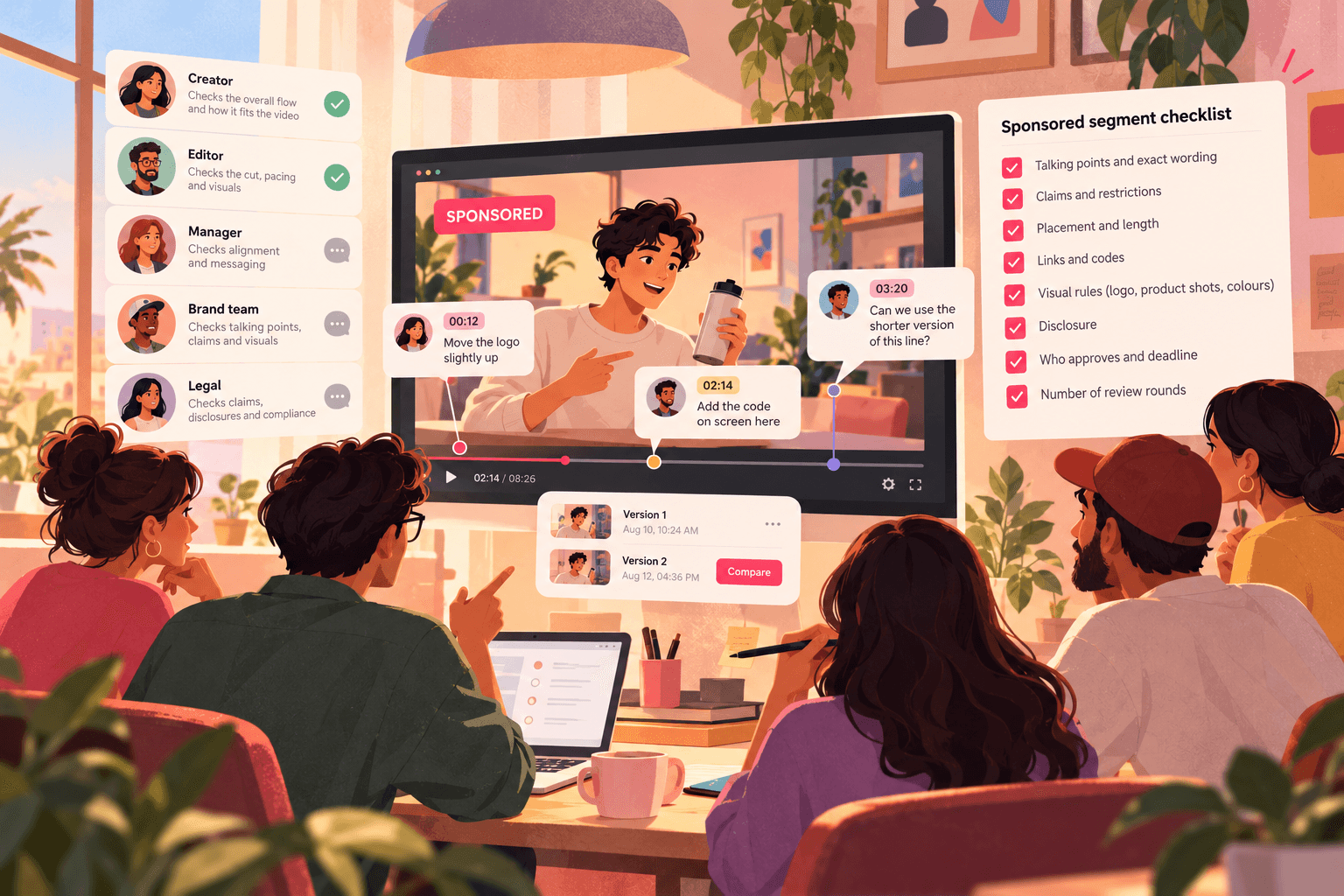
A sponsored segment usually has more reviewers than the rest of the video put together: the creator, the editor, the creator's manager, the brand's marketing team, sometimes an agency and a legal reviewer. Each one checks something different, and each one sends notes at a different time.
That's how a 60-second integration ends up taking four rounds and delaying the upload. Most of those rounds are avoidable with a shared checklist and one place to leave notes.
Before the shoot: agree on these in writing
Most approval problems start in the brief, not the edit. Get these from the brand before you film:
Talking points. The three or four things that must be said, and any exact wording that's required (product name, offer, claims).
Claims the brand can't make. Health, finance and performance claims often need specific wording or can't be made at all.
Placement and length. Pre-roll, mid-roll or dedicated video, and the target length of the segment.
Links and codes. The tracking link, discount code and where each one goes (description, pinned comment, on screen).
Visual rules. Logo use, product shots, colours, and anything the product must or must not be shown next to.
Who approves, and how fast. One named approver on the brand side, and a deadline for their notes.
Rounds. How many rounds of brand notes are included. Two is common.
The review checklist
Send the brand the cut with this list. Ask them to check only these points. Creative feedback on the rest of the video isn't theirs to give, unless your agreement says otherwise.
Wording and claims
Product name is said and spelled correctly on screen
Required talking points are all in
Offer, price and code are correct and current
No claims outside what was agreed
Disclosure
The segment is clearly identified as sponsored, early in the segment
YouTube's paid promotion setting will be turned on at upload
Disclosure meets the rules where the audience is (for example, ASCI guidelines in India, FTC guidance in the US, ASA rules in the UK)
Visuals
Logo and product shots follow the brand's guidelines
On-screen text, link and code are readable on a phone
Nothing in frame conflicts with the brand (a competitor's product, unsuitable content nearby)
Links and placement
Tracking link and code are in the description, in the agreed position
Pinned comment text is approved, if one is part of the deal
The segment is at the agreed position in the video
Timing
Segment length is within the agreed range
Publish date and time are confirmed
Send only the segment, or the whole video?
Send the whole video with the segment's timecodes marked, unless your agreement says otherwise. Brands often want to check what's around their segment. But tell them which part is theirs to approve, so their notes stay on it.
If the video isn't ready, send the segment first. Approving the integration early means late brand notes can't hold up the publish date.
How to keep it to one round
One link, one thread. Every reviewer on the brand side comments in the same place, so contradictions are visible before they reach the editor.
Timestamped notes only. "Say the offer more clearly" is hard to act on. "At 02:14, add the code on screen while I say it" is a five-minute fix.
One person consolidates. The brand's named approver confirms the final list before the editor starts.
Show what changed. Upload the revised cut as a new version, reply with a list of changes, and let the brand compare versions instead of rewatching everything.
Doing this in Seamlift
Upload the cut to a project and send the brand a share link. They watch in any browser and, with guest comments on, leave notes on the exact frame without making an account. You can add a password and an expiry date to the link and turn downloads off, so the unreleased video stays unreleased.
When the edit is revised, the new cut stacks as the next version, with the earlier notes kept on the version they were left on. Once approved, publish to YouTube from the same project, with the title, description, links and thumbnail staged during review. See how to review a video and publish it to YouTube from the same place.
FAQ
How long do brands usually take to approve a YouTube integration?
It varies a lot, from a day to over a week, which is why the deadline for notes should be in the agreement. Build the review time into your publishing schedule.
Can a brand ask for changes outside its segment?
Only if your agreement gives them that right. Most agreements limit brand approval to the integration and anything that mentions the brand.
What if the brand misses its review deadline?
Agree in advance what happens: the video publishes as is, or the date moves. Write it down before the shoot.
Should the brand get the final video file?
Usually not before it's published. A review link with downloads off lets them approve without holding the file.
Try Seamlift free: guest review links, versions and YouTube publishing on the free plan.
- youtube
- sponsorship
- client-review
- template